Every .in domain has to be linked to a verified person or organisation. The .IN registry requires the registrant's identity to be checked (eKYC), and until that check is done a new domain can be held and may not work. This guide explains who needs to verify, how to do it in the Domain India client area, and what to do if the domain still does not work afterwards.
Every registrant of a .in domain, or of any domain in the .in family such as .co.in, .net.in or .org.in, has to complete identity verification. At Domain India you do it on the Identity verification page, which uses DigiLocker. Make sure the registrant name on the domain matches your identity document before you start, and confirm the registry's email when it arrives. If the domain still does not work after both checks show complete, open a ticket.
1. What .in eKYC is, and who needs it
The .IN registry, run under NIXI, wants every .in domain to belong to a real, identifiable registrant. eKYC ("electronic Know Your Customer") is how that identity is confirmed online, without posting paper copies to anyone.
It applies to:
- .in and every extension in its family, including .co.in, .net.in, .org.in, .firm.in, .gen.in and .ind.in;
- every registrant, whether an individual, a proprietor, a company or an organisation;
- each registrant separately. If a domain is registered in your business partner's or your client's name, that person has to verify, not you.
Other extensions, such as .com, have a different check: the registrant confirms their email address by clicking a link. That is covered in Verification of WHOIS details.
2. What happens if verification is not done
Until the registrant is verified, the domain can be held. A held domain is taken out of DNS, so it stops resolving:
- your website does not load;
- email to addresses on the domain is not delivered;
- the registration itself still exists, and your hosting, files and mailboxes are untouched.
A brand-new .in domain you have just paid for may therefore not work until verification is complete. Once the reason for the hold is dealt with and the hold is lifted, the domain works again. Because DNS answers are cached around the internet, some visitors may see the old result for a few hours after that.
A domain on hold still expires on its normal date. A .in domain can be renewed at the normal price up to day 36 after expiry. From day 37 it can only be restored, for ₹4,000, which includes GST and the renewal. Pay the renewal invoice even while you sort out verification.
3. Before you start: check the registrant name
The name on your identity document must match the registrant name on the domain. A missing middle name, a different spelling or initials instead of a full name can stop verification from matching.
- Open your domains and click the .in domain.
- Open its Contacts tab and read the registrant name.
- Compare it with the name on your identity document.
If the names do not match, or the domain is registered in someone else's name, open a ticket before you verify. Changing the owner's name on a .in domain may need support's help, and verifying the wrong person does not help the domain.
Keep the registrant email and phone number current too. The registry sends its own confirmation to the registrant email address, so use an address you will still read in five years, ideally one that does not depend on the domain itself.
4. How to complete verification
- Sign in and open the domain.Go to your domains, click the .in domain and read any notice about identity or the registrant email.
- Open the Identity verification page.Go to Identity verification. The domain's page also points you there when verification is outstanding.
- Verify with DigiLocker.Follow the prompt to DigiLocker, the Government of India's digital document service, sign in, and agree to share your identity details for the verification.
- Read the result.Back in the client area, the Identity verification page shows whether verification succeeded.
- Confirm the registry's email.The .IN registry separately confirms the registrant email. When its message arrives at the registrant address, follow its instructions. Check your spam folder if you do not see it.
- Check the domain again.Open the domain's page and confirm that nothing is still marked as pending.
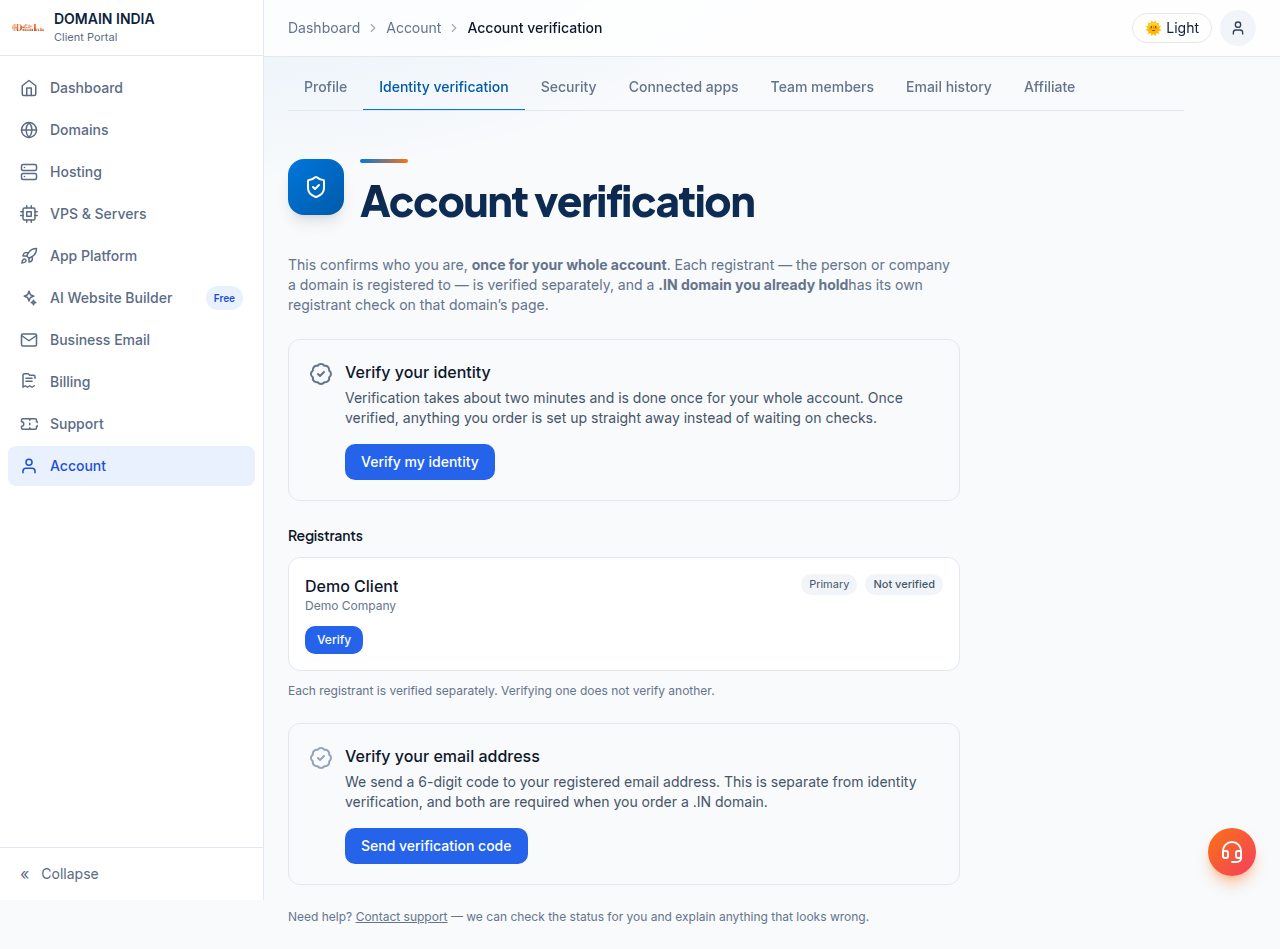
If you own several .in domains in the same name, the Identity verification page may offer to use your existing verification for another domain. You can use it, but if that domain stays on hold afterwards, open a ticket with the domain name.
5. The two checks, side by side
Identity verification and the registry's email check are separate. A domain can be suspended even when your identity is verified, if the email check is still pending.
| Check | Where you complete it | If it is left undone |
|---|---|---|
| Identity verification (eKYC) | The Identity verification page, using DigiLocker | The domain can be held and may not resolve |
| The registry's registrant email check | The confirmation email the registry sends to the registrant address | The domain can be suspended even when your identity is verified |
If the registry's email never arrived, the Identity verification page has a link to ask us to resend the registry's confirmation. If the email went to an old address, correct the registrant email on the domain's Contacts tab first.
6. If the domain still does not work
Give DNS a few hours after both checks show complete. If the domain still does not load, open a ticket with the domain name. Some holds are placed and lifted at the registry, and only the registry can lift them, so we act for you there. We cannot skip or override the registry's verification, and there is no way to switch a hold off from the client area.
For the difference between a hold set by the registrar and one set by the registry, read Understanding the serverHold status in .IN and .CO.IN domains.
7. Companies, and registrants outside India
Companies and organisations. The registrant should be the business itself or its proprietor, and the details on the domain should match the business's records. If DigiLocker does not fit your situation, for example because the registrant is a company rather than a person, open a ticket before you try to verify and we will explain the route for your domain.
Registrants outside India. DigiLocker is built around Indian identity records. If you are outside India or cannot use DigiLocker, open a ticket and we will explain the route for your domain. A .in domain also needs a genuine connection with India; read Who can register a .in domain before you buy one.
8. Accurate details and WHOIS privacy
Accurate registrant details are part of your registration agreement. Use your real name or your business's real name, a permanent address, and an email and phone number you control. Temporary or disposable email addresses and phone numbers can cause the registry's checks to fail.
Accurate details do not mean public details. For .in and its second-level extensions (.co.in, .net.in, .org.in and others), personal registrant details are not shown in public WHOIS. This is free and automatic; there is nothing to switch on.
9. .in domains at Domain India
Domain India is a NIXI-accredited .IN registrar, so for .in domains we deal with the registry directly. Identity verification, the registrant contacts, nameservers and renewals are all on the domain's page in your client area.
| Extension | Register (1 year) | Renew (per year) |
|---|---|---|
| .in | ₹575 | ₹625 |
| .co.in | ₹475 | ₹525 |
| .net.in / .org.in / .firm.in | ₹475 | ₹525 |
Domain India list prices on 19 September 2026, excluding 18% GST. Domain India never charges a saved card automatically: a renewal invoice is emailed up to 30 days before the due date, and the domain renews when that invoice is paid.
Frequently asked questions
Is eKYC mandatory for .in domains?
Yes. The .IN registry requires the registrant of every .in domain, and of every extension in the .in family such as .co.in, .net.in and .org.in, to have their identity verified. Until it is done, the domain can be held and may not resolve.
How do I complete eKYC for my .in domain at Domain India?
Sign in to the client area, open the Identity verification page and follow the prompt to DigiLocker. Then confirm the registry's email when it arrives at the registrant address. Check the domain's page afterwards to make sure nothing is still pending.
My name on the domain does not match my identity document. What should I do?
Open a ticket before you verify. The registrant name on the domain should match your identity document, and changing the owner's name on a .in domain may need support's help.
I completed eKYC but my .in domain still does not work. Why?
Check whether the registry's email check is still pending on the domain's page and on the Identity verification page. If both show complete and the domain still does not load after a few hours, open a ticket with the domain name; some holds are lifted at the registry and need us to act for you.
I live outside India. How do I verify my .in domain?
DigiLocker is built around Indian identity records, so it may not work for you. Open a ticket with the domain name and we will explain the route for your domain. A .in domain also requires a genuine connection with India.
Will my identity details be shown in public WHOIS?
No. For .in and its second-level extensions, personal registrant details are not shown in public WHOIS. This is free and automatic, and there is nothing to switch on. Company or organisation names may still appear.
Does a domain on hold still need to be renewed?
Yes. A hold does not change the expiry date. A .in domain can be renewed at the normal price up to day 36 after expiry; from day 37 it can only be restored, for ₹4,000 including GST and the renewal.
Ready to verify your domain?
Open your domains to see which .in domains need attention, then go to Identity verification to complete eKYC. If the name does not match, you are outside India, or the domain stays on hold, open a ticket with the domain name. Support is on 24/7 live chat, and tickets get a first response within 15 minutes, though resolution can take longer.
Complete identity verification with DigiLocker in your client area, then confirm the registry's email at the registrant address.
Verify your identity